1. Linear Layout
- (Linear)선
- Orientation - 방향(Linear Layout 에서는 방향이 중요함)
- Weight(가중치)
- Gravity
2. Relative Layout
- (Relative) 관계를 뜻함,상대
- 뷰끼리의 관계를 설정
3. Constraint Layout
- (Constraint) 강제,앵커
- 복잡한 뷰를 그릴때 조금더 유용함
Linear Layout 샘플 코드 - Orientation : Vertical
<?xml version="1.0" encoding="utf-8"?>
<LinearLayout
    xmlns:android="http://schemas.android.com/apk/res/android"
    xmlns:app="http://schemas.android.com/apk/res-auto"
    xmlns:tools="http://schemas.android.com/tools"
    android:layout_width="match_parent"
    android:layout_height="match_parent"
    tools:context=".MainActivity"
    android:orientation="vertical">

    <View
        android:layout_width="50dp"
        android:layout_height="50dp"
        android:background="#ED4A4A"
        />
    <View
        android:layout_width="50dp"
        android:layout_height="50dp"
        android:background="#44E10C"
        />
    <View
        android:layout_width="50dp"
        android:layout_height="50dp"
        android:background="#0C10E1"
        />
</LinearLayout>
화면
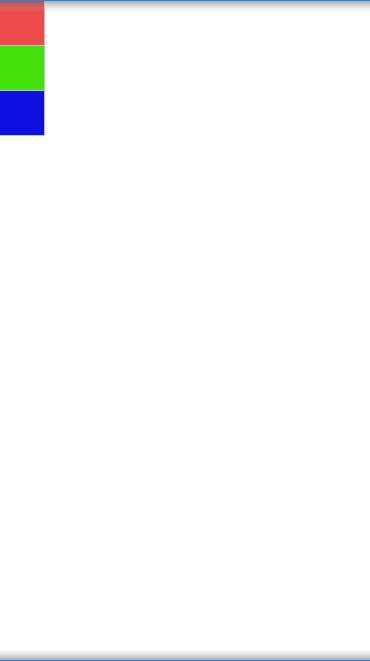
Linear Layout 샘플 코드 - Orientation : Horizontal
<?xml version="1.0" encoding="utf-8"?>
<LinearLayout
    xmlns:android="http://schemas.android.com/apk/res/android"
    xmlns:app="http://schemas.android.com/apk/res-auto"
    xmlns:tools="http://schemas.android.com/tools"
    android:layout_width="match_parent"
    android:layout_height="match_parent"
    tools:context=".MainActivity"
    android:orientation="horizontal">

    <View
        android:layout_width="50dp"
        android:layout_height="50dp"
        android:background="#ED4A4A"
        />
    <View
        android:layout_width="50dp"
        android:layout_height="50dp"
        android:background="#44E10C"
        />
    <View
        android:layout_width="50dp"
        android:layout_height="50dp"
        android:background="#0C10E1"
        />
</LinearLayout>
화면

Linear Layout 샘플 코드 - Weight
<?xml version="1.0" encoding="utf-8"?>
<LinearLayout
    xmlns:android="http://schemas.android.com/apk/res/android"
    xmlns:app="http://schemas.android.com/apk/res-auto"
    xmlns:tools="http://schemas.android.com/tools"
    android:layout_width="match_parent"
    android:layout_height="match_parent"
    tools:context=".MainActivity"
    android:orientation="horizontal"
    android:weightSum="3">

    <View
        android:layout_weight="1"
        android:layout_width="0dp"
        android:layout_height="50dp"
        android:background="#ED4A4A"
        />
    <View
        android:layout_weight="1"
        android:layout_width="0dp"
        android:layout_height="50dp"
        android:background="#44E10C"
        />
    <View
        android:layout_weight="1"
        android:layout_width="0dp"
        android:layout_height="50dp"
        android:background="#0C10E1"
        />
</LinearLayout>
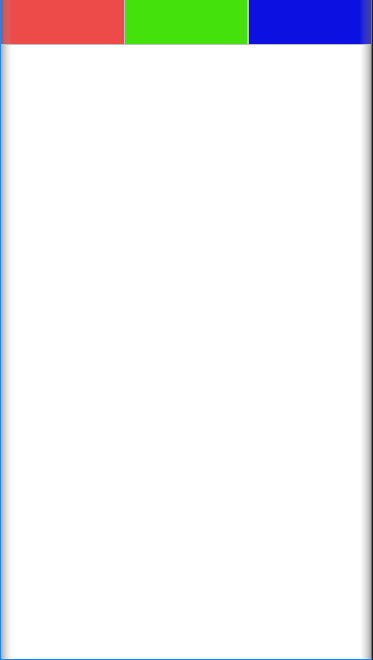
weightSum = "3"은 화면의 가로 전체를 3으로 잡고 아래에 나오는 View 3개에 각각 weight를 1로 주면 아래와 같이 균등하게 가로전체비율중 1/3씩 차지하게된다.
화면
LinearLayout 샘플코드 - Gravity(gravity-center)
<?xml version="1.0" encoding="utf-8"?>
<LinearLayout
    xmlns:android="http://schemas.android.com/apk/res/android"
    xmlns:app="http://schemas.android.com/apk/res-auto"
    xmlns:tools="http://schemas.android.com/tools"
    android:layout_width="match_parent"
    android:layout_height="match_parent"
    tools:context=".MainActivity"
    android:orientation="horizontal"
    android:weightSum="3"
    android:gravity="center">

    <View
        android:layout_weight="1"
        android:layout_width="0dp"
        android:layout_height="50dp"
        android:background="#ED4A4A"
        />
    <View
        android:layout_weight="1"
        android:layout_width="0dp"
        android:layout_height="50dp"
        android:background="#44E10C"
        />
    <View
        android:layout_weight="1"
        android:layout_width="0dp"
        android:layout_height="50dp"
        android:background="#0C10E1"
        />
</LinearLayout>
화면

'공부내용정리 > 안드로이드' 카테고리의 다른 글
| Collection의 함수형 API (0) | 2021.10.11 |
|---|---|
| (Kotlin) 클래스의 가시성 변경자 (0) | 2021.10.10 |
| Singleton 패턴 및 Object 클래스 (0) | 2021.10.06 |
| 코틀린 프로퍼티 위임 (0) | 2021.10.06 |
| Java의 정적 유틸리티 클래스 (0) | 2021.08.25 |