자바스크립트는 여러가지 방법으로 출력할수 있다
- HTML 요소에 innerHTML사용
- HTML 출력으로 document.write()사용
- 경고창 띄우기, window.alert()
- 브라우저 콘솔창에 쓰기, console.log()
* innerHTML사용
HTML요소에 접근하기 위해서는 document.getElementById(id)를 사용해야된다
id는 HTML의 요소를 의미하고 innerHTML은 HTML의 내용을 정의한다.
예시 코드
<!DOCTYPE html>
<html>
<body>

<h2>My First Web Page</h2>
<p>My First Paragraph.</p>

<p id="demo"></p>

<script>
document.getElementById("demo").innerHTML = 5 + 6;
</script>

</body>
</html>
결과

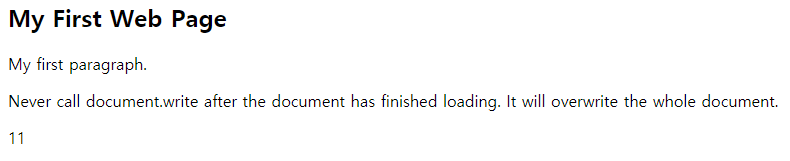
* document.write() 사용
예시 코드
<!DOCTYPE html>
<html>
<body>

<h2>My First Web Page</h2>
<p>My first paragraph.</p>

<p>Never call document.write after the document has finished loading.
It will overwrite the whole document.</p>

<script>
document.write(5 + 6);
</script>

</body>
</html>
결과
*유의할점!
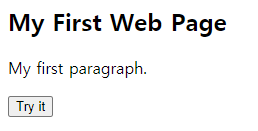
document.write는 페이지가 다 로딩 된후에 사용하게 되면 페이지에 있는 html이 다 지워지게 된다.
예시 코드
<!DOCTYPE html>
<html>
<body>

<h2>My First Web Page</h2>
<p>My first paragraph.</p>

<button type="button" onclick="document.write(5 + 6)">Try it</button>

</body>
</html>
결과 화면

* window.alert() 사용
window.alert()를 사용하게 되면 경고창을 띄우게 된다
예시코드
<!DOCTYPE html>
<html>
<body>

<h2>My First Web Page</h2>
<p>My first paragraph.</p>

<script>
window.alert(5 + 6);
</script>

</body>
</html>
결과 화면

* console.log() 사용
예시코드
<!DOCTYPE html>
<html>
<body>

<h2>Activate Debugging</h2>

<p>F12 on your keybord will activate debugging.</p>
<p>Then select "Console" in the debugger menu.</p>
<p>Then click Run again.</p>

<script>
console.log(5 + 6);
</script>

</body>
</html>
결과 화면

f12를 누른 화면

'공부내용정리 > JavaScript' 카테고리의 다른 글
| JavaScript 반복문 (0) | 2021.03.28 |
|---|---|
| JavaScript 조건문 (0) | 2021.03.28 |
| JAVASCRIPT 내용 정리 (0) | 2021.03.25 |
| 자바스크립트의 위치 (0) | 2021.03.12 |
| 자바스크립트 getElementById() (0) | 2021.03.12 |